> ## Documentation Index
> Fetch the complete documentation index at: https://docs.surge.app/llms.txt
> Use this file to discover all available pages before exploring further.
# Purchasing a Number
> Purchase local, toll-free, or short code phone numbers via API and understand per-plan phone number limits.
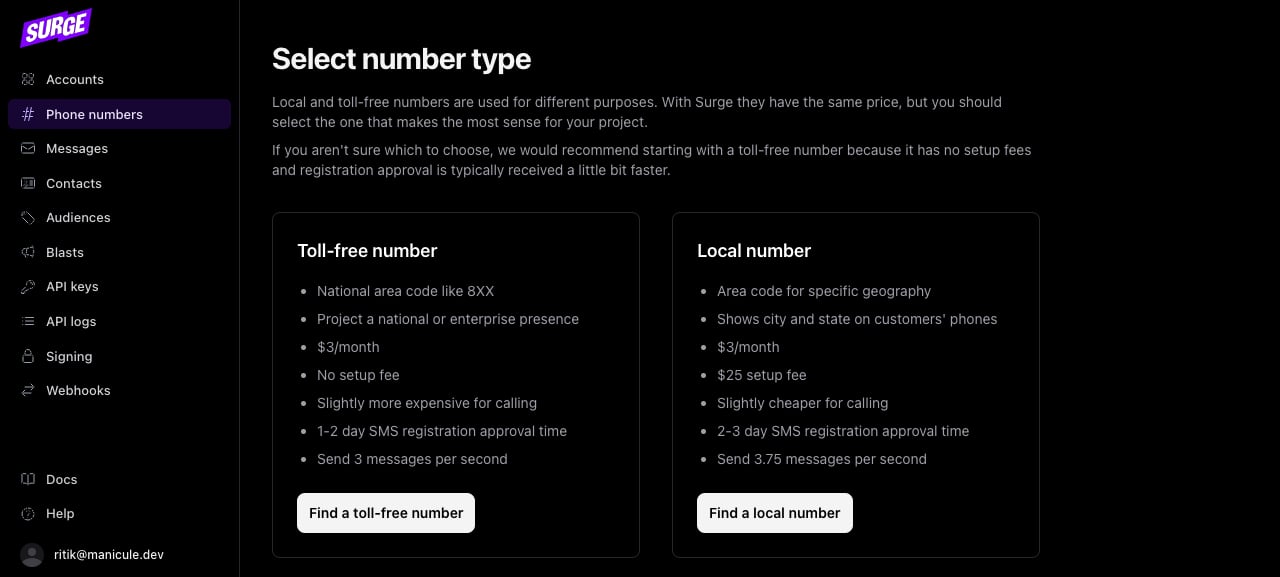
Surge supports three number types. Local and toll-free numbers are available via API. Short codes require a support request.
## Prerequisites
* **Active account and API key**: Both are required to call any phone number endpoint.
* **Plan that allows the number count you want**: Hobby is capped at 1, Starter at 25, Growth and Custom are unlimited.
* **A campaign to attach to (eventually)**: Numbers can be purchased before a campaign is active, but they can't send production traffic until they're attached. See [Attaching to a Campaign](./attaching).
## Number types
| Type | Purchase path | Use case |
| -------------- | ------------- | ------------------------------------------------ |
| **Local** | API | Standard SMS/MMS, most campaigns |
| **Toll-free** | API | High-volume transactional, customer care |
| **Short code** | Support | Very high-volume or marketing to large audiences |
The dashboard at [hq.surge.app](https://hq.surge.app) walks you through the same purchase via UI, useful for one-off numbers or for confirming pricing and approval timelines:
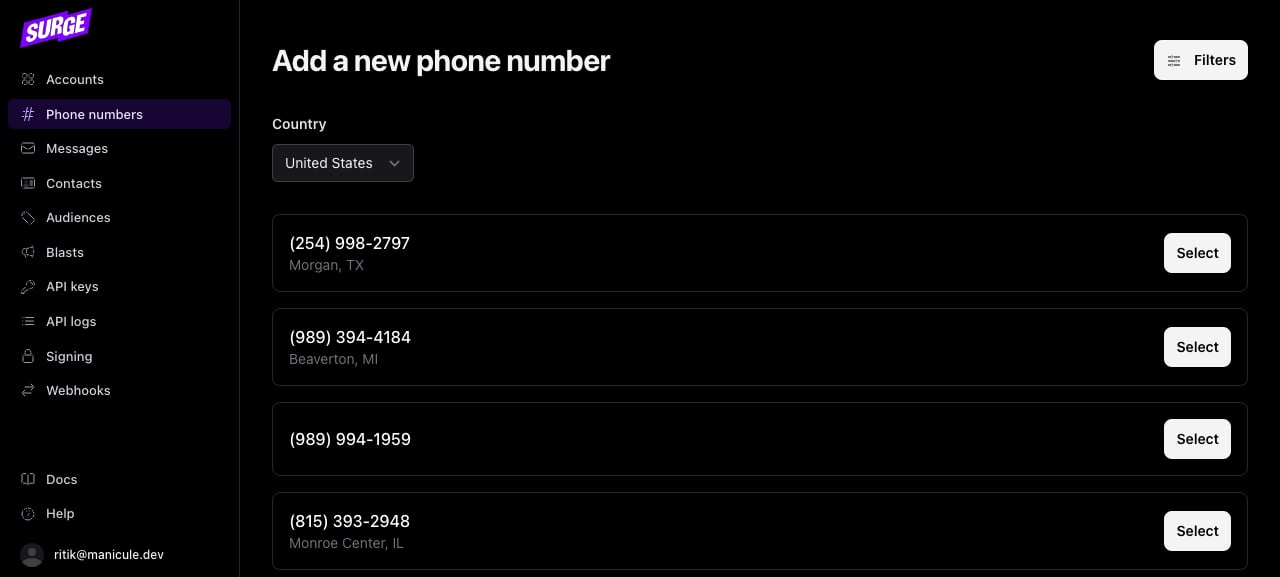
 After choosing the type, the dashboard shows currently-available numbers with city/state for local numbers:
 ## Purchase a local number
Pass `type: "local"` and an `area_code` to find an available number in that area:
```python Python theme={null}
from surge import Surge
surge = Surge()
number = surge.phone_numbers.purchase(
account_id="{account_id}",
type="local",
area_code="801",
)
```
```typescript TypeScript theme={null}
import Surge from "@surgeapi/node";
const surge = new Surge();
const number = await surge.phoneNumbers.purchase("{account_id}", {
type: "local",
area_code: "801",
});
```
```ruby Ruby theme={null}
require "surge_api"
surge = SurgeAPI::Client.new
number = surge.phone_numbers.purchase(
"{account_id}",
type: "local",
area_code: "801"
)
```
```elixir Elixir theme={null}
client = Surge.Client.new(System.get_env("SURGE_API_KEY"))
{:ok, number} =
Surge.PhoneNumbers.purchase(client, "{account_id}", %{
type: "local",
area_code: "801"
})
```
```bash cURL theme={null}
curl -X POST https://api.surge.app/accounts/{account_id}/phone_numbers \
-H "Authorization: Bearer YOUR_API_KEY" \
-H "Content-Type: application/json" \
-d '{
"type": "local",
"area_code": "801"
}'
```
```json theme={null}
{
"id": "pn_01jrzhe8d9enptypyx360pcmxm",
"number": "+18015559876",
"type": "local",
"campaign_id": null
}
```
If no numbers are available for the area code you specified, the API returns a `no_matching_numbers` error. Try a nearby area code or omit the `area_code` to get any available number.
If your account has reached its phone number limit, the API returns a `phone_number_limit` error. Limits by plan:
| Plan | Phone number limit |
| ------- | ------------------ |
| Hobby | 1 |
| Starter | 25 |
| Growth | Unlimited |
| Custom | Unlimited |
Contact support to upgrade your plan if you need more numbers.
## Purchase a toll-free number
```python Python theme={null}
number = surge.phone_numbers.purchase(
account_id="{account_id}",
type="toll_free",
)
```
```typescript TypeScript theme={null}
const number = await surge.phoneNumbers.purchase("{account_id}", {
type: "toll_free",
});
```
```ruby Ruby theme={null}
number = surge.phone_numbers.purchase(
"{account_id}",
type: "toll_free"
)
```
```elixir Elixir theme={null}
{:ok, number} =
Surge.PhoneNumbers.purchase(client, "{account_id}", %{type: "toll_free"})
```
```bash cURL theme={null}
curl -X POST https://api.surge.app/accounts/{account_id}/phone_numbers \
-H "Authorization: Bearer YOUR_API_KEY" \
-H "Content-Type: application/json" \
-d '{
"type": "toll_free"
}'
```
Toll-free numbers need to go through verification before they can send production traffic. See [Toll-Free Verification](../registration/toll-free).
## List existing numbers
Retrieve all phone numbers on an account:
```python Python theme={null}
for number in surge.phone_numbers.list(account_id="{account_id}"):
print(number.id, number.number)
```
```typescript TypeScript theme={null}
for await (const number of await surge.phoneNumbers.list("{account_id}")) {
console.log(number.id, number.number);
}
```
```ruby Ruby theme={null}
page = surge.phone_numbers.list("{account_id}")
page.data.each { |n| puts "#{n.id} #{n.number}" }
```
```elixir Elixir theme={null}
# Surge.PhoneNumbers.list isn't typed in the Elixir SDK yet — use the raw client.
{:ok, page} =
Surge.Client.request(client, :get, "/accounts/{account_id}/phone_numbers")
Enum.each(page["data"], fn n -> IO.puts("#{n["id"]} #{n["number"]}") end)
```
```bash cURL theme={null}
curl https://api.surge.app/accounts/{account_id}/phone_numbers \
-H "Authorization: Bearer YOUR_API_KEY"
```
```json theme={null}
{
"data": [
{
"id": "pn_01jrzhe8d9enptypyx360pcmxm",
"number": "+18015559876",
"type": "local",
"campaign_id": "cpn_01jrzhe8d9enptypyx360pcmxl"
}
],
"pagination": {
"next_cursor": null,
"previous_cursor": null
}
}
```
## Attaching to a campaign
A freshly purchased number has `campaign_id: null`. Surge attaches phone numbers to campaigns automatically. You don't call a separate endpoint. Two things trigger attachment:
* **Purchase while a campaign is active**: Surge attaches the number immediately.
* **Campaign becomes active after purchase**: Surge attaches all existing unattached numbers on the account when the campaign is approved.
When attachment completes, Surge fires a `phone_number.attached_to_campaign` webhook event. Once you receive that event, the number can send production traffic. See [Attaching to a Campaign](./attaching).
## Short codes
Short codes (5-6 digit numbers like `12345`) are available to all customers via a support request. They support very high message volumes and are the standard for large-scale marketing programs. Contact Surge support to start a short code request.
## Purchase a local number
Pass `type: "local"` and an `area_code` to find an available number in that area:
```python Python theme={null}
from surge import Surge
surge = Surge()
number = surge.phone_numbers.purchase(
account_id="{account_id}",
type="local",
area_code="801",
)
```
```typescript TypeScript theme={null}
import Surge from "@surgeapi/node";
const surge = new Surge();
const number = await surge.phoneNumbers.purchase("{account_id}", {
type: "local",
area_code: "801",
});
```
```ruby Ruby theme={null}
require "surge_api"
surge = SurgeAPI::Client.new
number = surge.phone_numbers.purchase(
"{account_id}",
type: "local",
area_code: "801"
)
```
```elixir Elixir theme={null}
client = Surge.Client.new(System.get_env("SURGE_API_KEY"))
{:ok, number} =
Surge.PhoneNumbers.purchase(client, "{account_id}", %{
type: "local",
area_code: "801"
})
```
```bash cURL theme={null}
curl -X POST https://api.surge.app/accounts/{account_id}/phone_numbers \
-H "Authorization: Bearer YOUR_API_KEY" \
-H "Content-Type: application/json" \
-d '{
"type": "local",
"area_code": "801"
}'
```
```json theme={null}
{
"id": "pn_01jrzhe8d9enptypyx360pcmxm",
"number": "+18015559876",
"type": "local",
"campaign_id": null
}
```
If no numbers are available for the area code you specified, the API returns a `no_matching_numbers` error. Try a nearby area code or omit the `area_code` to get any available number.
If your account has reached its phone number limit, the API returns a `phone_number_limit` error. Limits by plan:
| Plan | Phone number limit |
| ------- | ------------------ |
| Hobby | 1 |
| Starter | 25 |
| Growth | Unlimited |
| Custom | Unlimited |
Contact support to upgrade your plan if you need more numbers.
## Purchase a toll-free number
```python Python theme={null}
number = surge.phone_numbers.purchase(
account_id="{account_id}",
type="toll_free",
)
```
```typescript TypeScript theme={null}
const number = await surge.phoneNumbers.purchase("{account_id}", {
type: "toll_free",
});
```
```ruby Ruby theme={null}
number = surge.phone_numbers.purchase(
"{account_id}",
type: "toll_free"
)
```
```elixir Elixir theme={null}
{:ok, number} =
Surge.PhoneNumbers.purchase(client, "{account_id}", %{type: "toll_free"})
```
```bash cURL theme={null}
curl -X POST https://api.surge.app/accounts/{account_id}/phone_numbers \
-H "Authorization: Bearer YOUR_API_KEY" \
-H "Content-Type: application/json" \
-d '{
"type": "toll_free"
}'
```
Toll-free numbers need to go through verification before they can send production traffic. See [Toll-Free Verification](../registration/toll-free).
## List existing numbers
Retrieve all phone numbers on an account:
```python Python theme={null}
for number in surge.phone_numbers.list(account_id="{account_id}"):
print(number.id, number.number)
```
```typescript TypeScript theme={null}
for await (const number of await surge.phoneNumbers.list("{account_id}")) {
console.log(number.id, number.number);
}
```
```ruby Ruby theme={null}
page = surge.phone_numbers.list("{account_id}")
page.data.each { |n| puts "#{n.id} #{n.number}" }
```
```elixir Elixir theme={null}
# Surge.PhoneNumbers.list isn't typed in the Elixir SDK yet — use the raw client.
{:ok, page} =
Surge.Client.request(client, :get, "/accounts/{account_id}/phone_numbers")
Enum.each(page["data"], fn n -> IO.puts("#{n["id"]} #{n["number"]}") end)
```
```bash cURL theme={null}
curl https://api.surge.app/accounts/{account_id}/phone_numbers \
-H "Authorization: Bearer YOUR_API_KEY"
```
```json theme={null}
{
"data": [
{
"id": "pn_01jrzhe8d9enptypyx360pcmxm",
"number": "+18015559876",
"type": "local",
"campaign_id": "cpn_01jrzhe8d9enptypyx360pcmxl"
}
],
"pagination": {
"next_cursor": null,
"previous_cursor": null
}
}
```
## Attaching to a campaign
A freshly purchased number has `campaign_id: null`. Surge attaches phone numbers to campaigns automatically. You don't call a separate endpoint. Two things trigger attachment:
* **Purchase while a campaign is active**: Surge attaches the number immediately.
* **Campaign becomes active after purchase**: Surge attaches all existing unattached numbers on the account when the campaign is approved.
When attachment completes, Surge fires a `phone_number.attached_to_campaign` webhook event. Once you receive that event, the number can send production traffic. See [Attaching to a Campaign](./attaching).
## Short codes
Short codes (5-6 digit numbers like `12345`) are available to all customers via a support request. They support very high message volumes and are the standard for large-scale marketing programs. Contact Surge support to start a short code request.